Lesson 7
Files, Paths, Projects, and Reproducibility
Big question
How can a project find its data tomorrow, on another computer, and after being uploaded to a website?
Lesson progress
Complete checkpoints as you learn
Learning objectives
- Build a portable project tree.
- Use pathlib and relative paths.
- Separate raw, frozen, processed, and generated files.
- Record versions, sources, and random seeds.
- Prerequisites: Chapter 6.
- Key terms: pathlib, relative path, project root, metadata, version control, seed.
Simple explanation
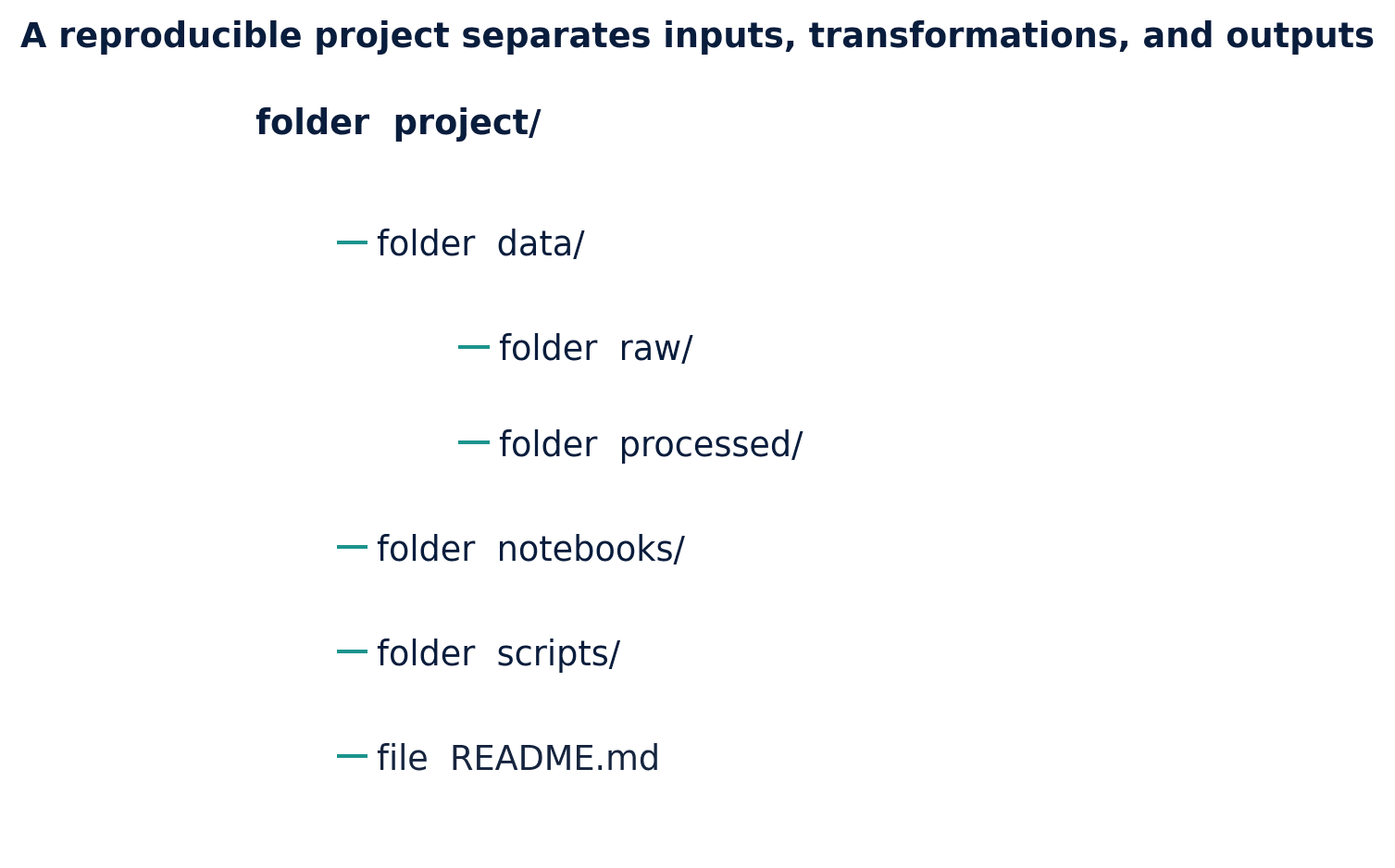
A reproducible project separates source data, processed data, scripts, notebooks, figures, tables, and documentation. The directory names act as a map for both humans and code. Raw or frozen data should not be overwritten by a cleaning script. Generated figures should be reproducible from code. Temporary caches and credentials should not be included in a public package.
Key terms
- Build a portable project tree
- A core idea in Chapter 7 that students apply carefully in economic analysis.
- pathlib and relative paths
- A core idea in Chapter 7 that students apply carefully in economic analysis.
- Separate raw, frozen, processed, and generated files
- A core idea in Chapter 7 that students apply carefully in economic analysis.
- Record versions, sources, and random seeds
- A core idea in Chapter 7 that students apply carefully in economic analysis.
- Prerequisites: Chapter 6
- A core idea in Chapter 7 that students apply carefully in economic analysis.
- Key terms: pathlib, relative path, project root, metadata, version control, seed
- A core idea in Chapter 7 that students apply carefully in economic analysis.
Analytical workflow
Interpret the expression in words and units before using it in a claim.
Example
Interpretation. The path expresses the file type and project role without assuming an operating system.
Prerequisites
- Complete the preceding course chapters or review their summaries as needed.
Full theory and examples
7.2
A project is a map, not a pile
A reproducible project separates source data, processed data, scripts, notebooks, figures, tables, and documentation. The directory names act as a map for both humans and code. Raw or frozen data should not be overwritten by a cleaning script. Generated figures should be reproducible from code. Temporary caches and credentials should not be included in a public package.
7.3
Relative paths travel
A hard-coded path such as C:/Users/name/Desktop/data.csv describes one computer. A relative path such as data/frozen/series.csv describes the file’s role within the project. pathlib.Path provides cross-platform path construction and file operations. The project root should be established once rather than changed repeatedly with working-directory commands.
7.4
Reproducibility includes provenance
Saving code is not enough. The analyst should record where each dataset came from, the retrieval date, the series identifier, the transformations applied, and whether redistribution is permitted. Environment files record package versions. Random seeds stabilize demonstrations. Git records the evolution of text and code, although large or restricted data may require a separate governance plan.
7.5
Python demonstrations
7.5.1
Demonstration 7.1: Build portable paths
Verified output
Interpretation. The path expresses the file type and project role without assuming an operating system.
7.5.2
Demonstration 7.2: Write metadata beside data
Verified output
Interpretation. Metadata becomes a first-class project artifact rather than a memory held by one analyst.
7.6
Visual evidence
7.7
Reference table
Why This Matters
A portable project can be rebuilt, inspected, and taught without reconstructing someone else’s desktop.
Common Mistake
Changing the working directory inside multiple notebook cells. The result depends on execution order and becomes difficult to diagnose.
Ceteris LAB Tip
Design the folder tree before downloading data. A clear destination discourages accidental mixing of raw and processed files.
R-to-Python / Source Bridge
The source notes recommended setwd() and personal directories. The new workflow eliminates that brittle dependency and underpins every notebook in the public package.
| Folder | Purpose | Rule |
|---|---|---|
| data/raw | untouched acquisition | never edit manually |
| data/frozen | redistributable snapshot | record source and date |
| data/processed | analysis-ready outputs | rebuild from code |
| scripts | reusable programs | no credentials |
| notebooks | guided analysis | run top to bottom |
| figures/tables | generated products | do not hand-edit |
Visual evidence
Additional Python demonstrations
Live Python
Source demonstration 2
Source demonstration 2
Stdout
Run Python to see results here.
Status / stderr
Ready to run Python in your browser.
Line-by-line guide
- Line 1Load a Python library needed for data work or regression.
- Line 2Load a Python library needed for data work or regression.
- Line 4Create or update a Python object used in the analysis.
- Line 5Run this Python instruction as part of the lesson workflow.
- Line 6Run this Python instruction as part of the lesson workflow.
- Line 7Run this Python instruction as part of the lesson workflow.
- Line 8Run this Python instruction as part of the lesson workflow.
- Line 9Create or update a Python object used in the analysis.
- Line 10Create or update a Python object used in the analysis.
- Line 11Create or update a Python object used in the analysis.
- Line 12Display a result so students can inspect the output.
Verified source output
.png
figures
True
.png figures
Interpretation. The path expresses the file type and project role without assuming an operating system.
Interpretation. Metadata becomes a first-class project artifact rather than a memory held by one analyst.
Guided practice
- 1Re-run Demonstration 7.1 and change one input while keeping the analytical question fixed.
- 2Explain in two sentences how the output supports, or fails to support, the chapter opening question.
- 3Add one validation check that would prevent a plausible error.
Exercises
- 1Create the project tree shown in the table.
- 2Write a JSON metadata file for a dataset.
- 3Explain why frozen and processed data are different.
- 4Initialize a Git repository and identify files that should be ignored.
Source and downloads
Chapter 7 of Fundamentals of Python for Financial Econometrics by Mohammad Safavi, Ph.D.. The lesson is an original Ceteris Lab web adaptation of the supplied publication package.
Live Python
Files, Paths, Projects, and Reproducibility: live Python
Files, Paths, Projects, and Reproducibility: live Python
Stdout
Run Python to see results here.
Status / stderr
Ready to run Python in your browser.
Line-by-line guide
- Line 1Load a Python library needed for data work or regression.
- Line 3Create or update a Python object used in the analysis.
- Line 4Create or update a Python object used in the analysis.
- Line 5Display a result so students can inspect the output.
- Line 6Display a result so students can inspect the output.
Python walkthrough
- 1`from pathlib import Path`: Loads a package or function used by the analysis.
- 2`root = Path.cwd()`: Creates or updates a named object used by later steps.
- 3`figure_path = root / "figures" / "example.png"`: Creates or updates a named object used by later steps.
- 4`print(figure_path.suffix)`: Displays a result so it can be checked and interpreted.
- 5`print(figure_path.parent.name)`: Displays a result so it can be checked and interpreted.
Live notebook
Run this lesson as a notebook
Open an editable notebook cell-by-cell, run Python in the browser, and download the `.ipynb` file for later.
Related dataset
Ceteris Lab teaching sample
Estimated time
35 to 55 min
Packages
pandas, numpy
Expected output
Printed Python results that can be compared with the lesson explanation.
Learning goals
- Load and inspect Ceteris Lab teaching sample.
- Run the Python cells connected to Files, Paths, Projects, and Reproducibility.
- Interpret the output using Build a portable project tree and pathlib and relative paths.
Common errors
- File not found: check that wage_sample.csv is installed or use the course data folder.
- Package import error: use the browser notebook first, then download for local Jupyter if your local packages differ.
- Column name error: compare your variable names with the dataset variables listed for this notebook.
Dataset path helper
import pandas as pd

df = pd.read_csv("/data/wage_sample.csv")
df.head()
Interactive activity
Chapter 7 interactive
Reproducible Python decision lab
Which step should come before trusting a successful Python run?
Immediate feedback
Choose a decision, then test how the claim changes as evidence becomes stronger or weaker.
Try it yourself
Write one plain-English sentence explaining the main idea from this lesson.
Common mistakes
Check these before you move on.
Return to the lesson assumptions, units, diagnostics, and source evidence to replace this shortcut with a defensible interpretation.
Quick quiz
Which statement best answers the Chapter 7 opening question: How can a project find its data tomorrow, on another computer, and after being uploaded to a website?
Quick quiz
Which practice should be avoided when applying Files, Paths, Projects, and Reproducibility?
Quick quiz
What is the most defensible way to interpret the Python demonstration?
Quick quiz
Why does Chapter 7 matter in an applied econometrics workflow?
Key takeaway
Project structure is part of the analytical method. Relative paths make workflows portable. Provenance and environment records are necessary for reproducibility.