Lesson 52
Language Models, Retrieval, and AI Agents for Econometric Research
Big question
How can a language model answer from a controlled evidence collection, use tools, and still remain subject to verification?
Lesson progress
Complete checkpoints as you learn
Learning objectives
- Explain next-token prediction and context windows.
- Build a simple retrieval-augmented workflow.
- Describe agent loops, tools, memory, and stopping conditions.
- Evaluate grounding, privacy, cost, and safety.
- Prerequisites: Chapters 27, 28, and 32.
- Key terms: language model, context window, RAG, retrieval, agent, tool use.
Simple explanation
A language model estimates a probability distribution over next tokens given prior context. Repeated sampling produces text. The model can encode extensive patterns without storing a searchable database of exact facts. Context windows limit how much prompt and retrieved material can be considered at once. Generated probability does not provide source attribution or truth verification.
Key terms
- next-token prediction and context windows
- A core idea in Chapter 52 that students apply carefully in economic analysis.
- Build a simple retrieval-augmented workflow
- A core idea in Chapter 52 that students apply carefully in economic analysis.
- agent loops, tools, memory, and stopping conditions
- A core idea in Chapter 52 that students apply carefully in economic analysis.
- Evaluate grounding, privacy, cost, and safety
- A core idea in Chapter 52 that students apply carefully in economic analysis.
- Prerequisites: Chapters 27, 28, and 32
- A core idea in Chapter 52 that students apply carefully in economic analysis.
- Key terms: language model, context window, RAG, retrieval, agent, tool use
- A core idea in Chapter 52 that students apply carefully in economic analysis.
Analytical workflow
Interpret the expression in words and units before using it in a claim.
Example
Interpretation. The retrieval step is local, inspectable, and requires no paid API. A larger system needs better embeddings and evaluation.
Prerequisites
- Complete the preceding course chapters or review their summaries as needed.
Full theory and examples
52.2
A language model predicts continuations
A language model estimates a probability distribution over next tokens given prior context. Repeated sampling produces text. The model can encode extensive patterns without storing a searchable database of exact facts. Context windows limit how much prompt and retrieved material can be considered at once. Generated probability does not provide source attribution or truth verification.
52.3
Retrieval creates an evidence channel
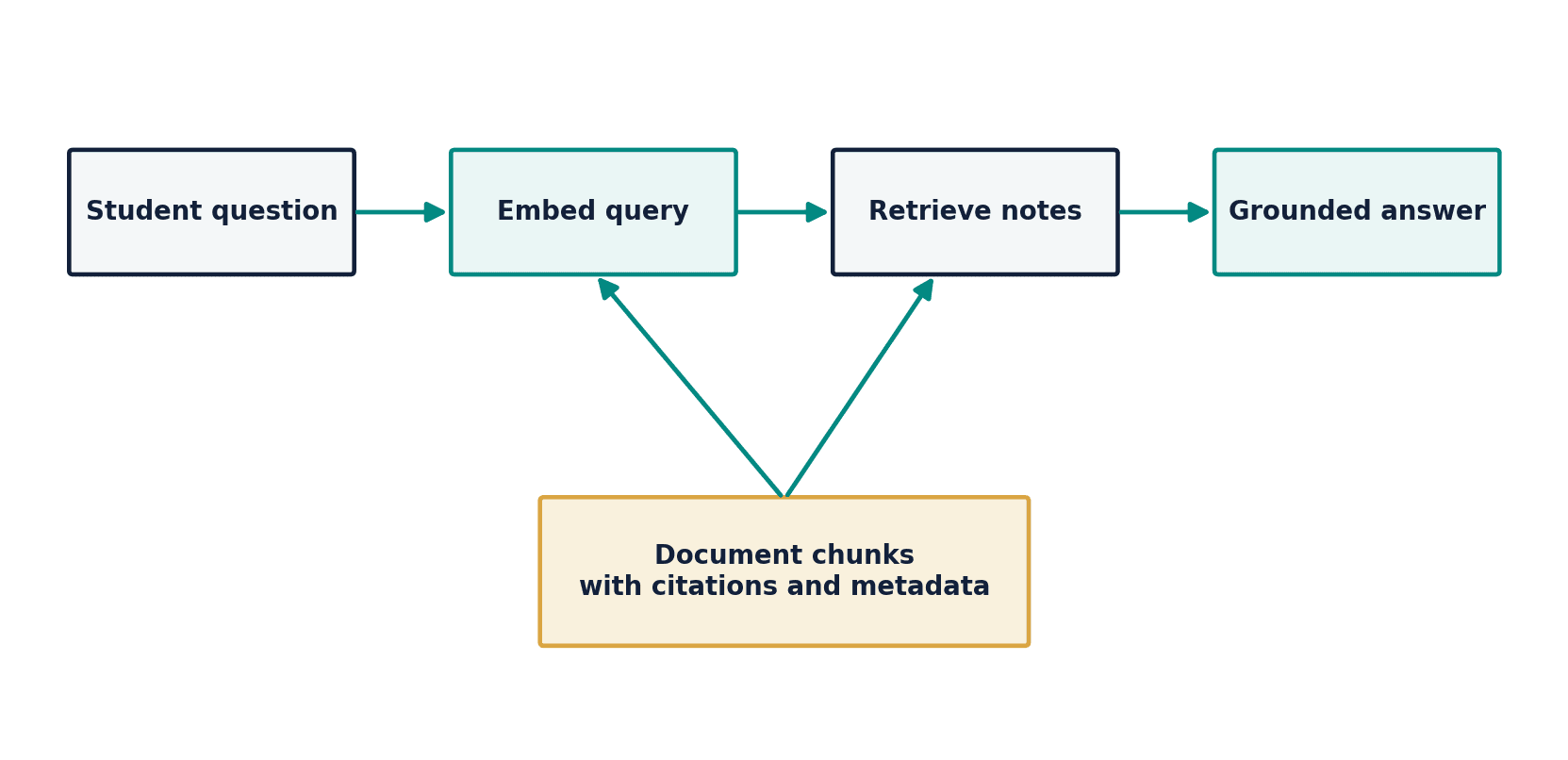
Retrieval-augmented generation separates document search from response generation. Documents are split into chunks, represented for retrieval, ranked against a query, and inserted into the model context. The response can then cite the retrieved evidence. Failure can occur at ingestion, chunking, indexing, retrieval, context selection, or generation. A grounded answer requires both relevant evidence and faithful use of that evidence.
52.4
Agents are loops with authority
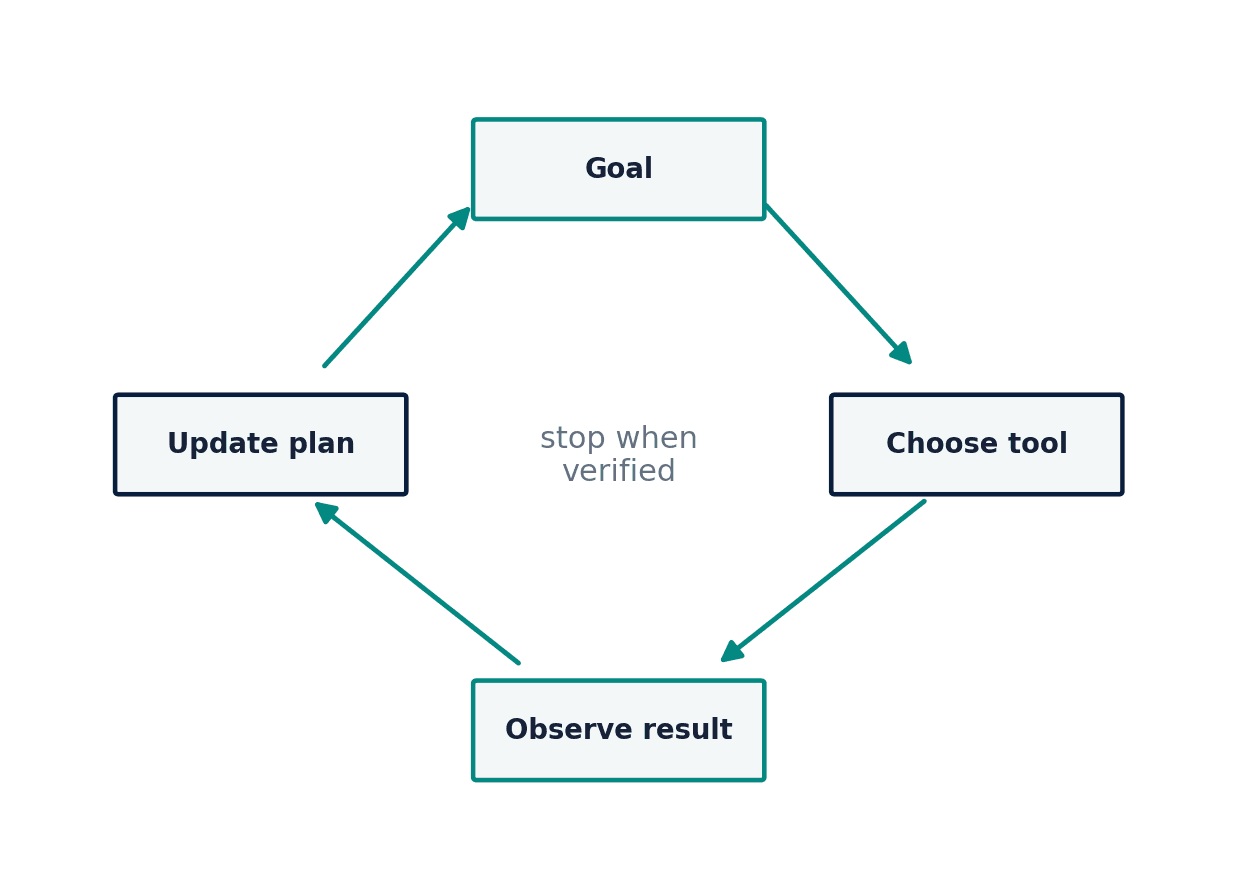
An AI agent typically observes a goal and state, chooses an action, calls a tool, receives a result, updates memory, and decides whether to continue. Tool permissions, input validation, rate limits, budgets, and stopping conditions are safety controls. Memory may improve continuity while increasing privacy and contamination risks. An agent should not receive more authority than the task requires, and consequential actions need confirmation and audit logs.
52.5
Python demonstrations
52.5.1
Demonstration 33.1: A local retrieval demonstration
Verified output
Interpretation. The retrieval step is local, inspectable, and requires no paid API. A larger system needs better embeddings and evaluation.
52.5.2
Demonstration 33.2: A bounded tool loop
Verified output
Interpretation. A maximum-step guard prevents an unbounded loop. Real agents also need tool-specific permissions, validation, and human confirmation.
52.6
Visual evidence
52.7
Reference table
Why This Matters
Retrieval and tools can improve grounding and capability, but they add new failure surfaces that must be observed and tested.
Common Mistake
Assuming that adding documents to a vector store guarantees that the model will retrieve and cite the correct evidence.
Ceteris LAB Tip
Evaluate retrieval separately from generation: first ask whether the right chunk was found, then whether the answer used it faithfully.
R-to-Python / Source Bridge
The chapter adapts IntroAI session 10 on small language models, chatbots, retrieval, memory, agents, and tool use. The required lab remains local and no-API, with optional extensions clearly separated (Sharifi-Zarchi and contributors 2026).
| Component | Function | Failure mode |
|---|---|---|
| chunker | divide documents | cuts crucial context |
| retriever | rank evidence | misses relevant source |
| generator | compose answer | ignores or distorts evidence |
| tool | perform action or query | unsafe/invalid invocation |
| memory | retain state | privacy or stale assumptions |
| evaluator | check answer and process | weak metric or circular grading |
Visual evidence
Additional Python demonstrations
Live Python
Source demonstration 2
Source demonstration 2
Stdout
Run Python to see results here.
Status / stderr
Ready to run Python in your browser.
Line-by-line guide
- Line 1Create or update a Python object used in the analysis.
- Line 2Run this Python instruction as part of the lesson workflow.
- Line 3Create or update a Python object used in the analysis.
- Line 4Create or update a Python object used in the analysis.
- Line 5Create or update a Python object used in the analysis.
- Line 6Display a result so students can inspect the output.
Verified source output
1 Expected Shortfall averages losses beyond the VaR threshold.
{'step': 2, 'done': True}Interpretation. The retrieval step is local, inspectable, and requires no paid API. A larger system needs better embeddings and evaluation.
Interpretation. A maximum-step guard prevents an unbounded loop. Real agents also need tool-specific permissions, validation, and human confirmation.
Guided practice
- 1Re-run Demonstration 33.1 and change one input while keeping the analytical question fixed.
- 2Explain in two sentences how the output supports, or fails to support, the chapter opening question.
- 3Add one validation check that would prevent a plausible error.
Exercises
- 1Create a TF-IDF retriever for five course notes.
- 2Design three chunking strategies and compare them.
- 3Specify tools and permissions for a safe data-analysis agent.
- 4Write a stopping rule and budget for an agent loop.
Source and downloads
Chapter 52 of Fundamentals of Python for Financial Econometrics by Mohammad Safavi, Ph.D.. The lesson is an original Ceteris Lab web adaptation of the supplied publication package.
Live Python
Language Models, Retrieval, and AI Agents for Econometric Research: live Python
Language Models, Retrieval, and AI Agents for Econometric Research: live Python
Stdout
Run Python to see results here.
Status / stderr
Ready to run Python in your browser.
Line-by-line guide
- Line 1Load a Python library needed for data work or regression.
- Line 2Load a Python library needed for data work or regression.
- Line 4Create or update a Python object used in the analysis.
- Line 5Run this Python instruction as part of the lesson workflow.
- Line 6Run this Python instruction as part of the lesson workflow.
- Line 7Run this Python instruction as part of the lesson workflow.
- Line 8Run this Python instruction as part of the lesson workflow.
- Line 9Create or update a Python object used in the analysis.
- Line 10Create or update a Python object used in the analysis.
- Line 11Create or update a Python object used in the analysis.
- Line 12Create or update a Python object used in the analysis.
- Line 13Display a result so students can inspect the output.
Python walkthrough
- 1`from sklearn.feature_extraction.text import TfidfVectorizer`: Loads a package or function used by the analysis.
- 2`from sklearn.metrics.pairwise import cosine_similarity`: Loads a package or function used by the analysis.
- 3`chunks = [`: Creates or updates a named object used by later steps.
- 4`"Value at Risk is a loss quantile at a stated horizon and confidence level.",`: Executes the next transparent step in the workflow.
- 5`"Expected Shortfall averages losses beyond the VaR threshold.",`: Executes the next transparent step in the workflow.
- 6`"An AR model relates a series to its own lags.",`: Executes the next transparent step in the workflow.
- 7`]`: Executes the next transparent step in the workflow.
- 8`query = "What summarizes losses worse than VaR?"`: Creates or updates a named object used by later steps.
- 9`vec = TfidfVectorizer().fit(chunks + [query])`: Fits the specified statistical or machine-learning model.
- 10`X = vec.transform(chunks + [query])`: Creates or updates a named object used by later steps.
- 11`scores = cosine_similarity(X[-1], X[:-1]).ravel()`: Creates or updates a named object used by later steps.
- 12`print(scores.argmax(), chunks[scores.argmax()])`: Displays a result so it can be checked and interpreted.
Live notebook
Run this lesson as a notebook
Open an editable notebook cell-by-cell, run Python in the browser, and download the `.ipynb` file for later.
Related dataset
Ceteris Lab teaching sample
Estimated time
25 to 40 min
Packages
pandas, numpy, statsmodels, patsy
Expected output
A regression or inference table with coefficients, uncertainty, and short interpretation notes.
Learning goals
- Load and inspect Ceteris Lab teaching sample.
- Run the Python cells connected to Language Models, Retrieval, and AI Agents for Econometric Research.
- Interpret the output using next-token prediction and context windows and Build a simple retrieval-augmented workflow.
Common errors
- File not found: check that wage_sample.csv is installed or use the course data folder.
- Package import error: use the browser notebook first, then download for local Jupyter if your local packages differ.
- Column name error: compare your variable names with the dataset variables listed for this notebook.
Dataset path helper
import pandas as pd

df = pd.read_csv("/data/wage_sample.csv")
df.head()
Interactive activity
Chapter 52 interactive
Model governance check
What is the safest basis for evaluating an ML or AI result?
Immediate feedback
Choose a decision, then test how the claim changes as evidence becomes stronger or weaker.
Try it yourself
Write one plain-English sentence explaining the main idea from this lesson.
Common mistakes
Check these before you move on.
Return to the lesson assumptions, units, diagnostics, and source evidence to replace this shortcut with a defensible interpretation.
Quick quiz
Which statement best answers the Chapter 52 opening question: How can a language model answer from a controlled evidence collection, use tools, and still remain subject to verification?
Quick quiz
Which practice should be avoided when applying Language Models, Retrieval, and AI Agents for Econometric Research?
Quick quiz
What is the most defensible way to interpret the Python demonstration?
Quick quiz
Why does Chapter 52 matter in an applied econometrics workflow?
Key takeaway
Language models generate token continuations rather than verified facts. RAG adds a retrievable evidence path. Agents require bounded tools, memory controls, and stopping conditions.